von Erfolg Im Netz | Sep. 10, 2016 | Admin, Allgemein

Live-Streaming wird immer beliebter. Das ist kein Wunder, denn durch Einbindung der Live-Streaming-Funktion in die Sozialen Netze wird hier das Potential des Web 2.0 voll ausgeschöpft:
Mobil und aus nächster Nähe können Menschen unmittelbar und in Echtzeit am Geschehen teilhaben. Der Wunsch des Netzes nach immer neuem, möglichst frischem Content wird hier befriedigt. Hinzu kommt, dass der Mensch ein visuelles Wesen ist, sodass Bewegtbild ihn viel eher fesselt als reiner Text.
Formate wie YouTube-Videos hat Content via Live-Streaming-Dienst voraus, dass Zuschauer das Gefühl von Unmittelbarkeit bekommen und es zugleich zu künstlicher Verknappung kommt: Live gestreamte Inhalte sind oft nur noch kurze Zeit abrufbar – wer nicht dabei war, war eben nicht dabei. Live-Videos werden so, anders als die meisten Online-Videos, zum Event. Das Wissen, das nichts nachbearbeitet oder herausgeschnitten werden kann, sorgt für den Eindruck von Authentizität und Glaubwürdigkeit. Live Streaming als solches ist nicht neu, aber Dienste wie die Twitter-Tochter Periscope oder Facebook haben geholfen, die Reichweite des Formats zu erhöhen und machen es eigentlich jedem möglich, andere zu Zeugen alltäglicher und weniger alltäglicher Aktionen zu machen.
Wie aber können Unternehmer davon profitieren?
Dass Live-Stream und Social Media von Medienunternehmen genutzt werden versteht sich von selbst. Von tagesschau.de auf Facebook bis hin zur BILD nutzen sie die Möglichkeiten von Live-Streaming, um Abonnenten und Profilbesucher in Echtzeit auf den neuesten Stand zu bringen. Die Live-Streaming-Dienste dienen hier als ein kostengünstiger Verwandter des klassischen Fernsehens, aber sie können noch mehr.
Wie Marketing und Live-Streaming via App zusammenfinden zeigen folgende Beispiele: Im Sommer 2015 nutzte der Automobilhersteller Chevrolet Periscope, um den neuen Chevrolet Camaro vorzustellen. Seit April des selben Jahres benutzt der FC Schalke 04 den Dienst, um Fans an Presseterminen teilhaben zu lassen. McDonalds indessen enthüllte vor der Facebook-Öffentlichkeit anlässlich des US-amerikanischen Hamburger-Tages (National Hamburger Day) drei vom Konzern in Auftrag gegebene Ölgemälde, auf denen – natürlich – Burger zu sehen waren.
Nicht nur für die Vorführung neuer Produkte und als Multiplikator für offizielle Ankündigungen kann Live-Streaming interessant sein. Auch die Kundenbindung lässt sich damit pflegen. Per Live-Stream können Unternehmen die Zielgruppe hinter die Kulissen schauen lassen. Events eignen sich gut dafür. Aber auch wo ein aufwändiger oder anschaulicher Produktionsprozess hinter dem Produkt steht, kann dieser gezeigt werden. Der Zugang zum Live-Stream kann dabei reglementiert werden, um mit „Exklusivinhalten“ zu arbeiten, sofern es sinnvoll scheint. Und warum nicht einen Influencer als Moderator ins Boot holen? Wenn es um Employer Branding geht, also der Positionierung des Unternehmens als Arbeitgeber, können Mitarbeiter vor die Kamera geholt oder Führungen durch den Firmensitz veranstaltet werden. Gegenüber klassischen Übertragungsformaten bieten Live-Streaming-Dienste über die Kommentarfunktion die Möglichkeit, in beide Richtungen zu kommunizieren. So können Zuschauerfragen unmittelbar beantwortet werden. Dementsprechend gut geeignet ist Live-Streaming auch als Medium für Frage-Antwort-Runden. Theoretisch eignet sich der Live-Stream auch für Kundenberatung und -support, wenn live zu einem Mitarbeiter hinübergeschaltet werden kann, der Rede und Antwort in Sachen Verkauf oder Troubleshooting steht. Der Live-Stream tritt in diesem Fall die Nachfolge des Kundenservice via Live-Chat an.
Welche Anwendungen kann ich nutzen?
Für welche Social-Media-Plattform bzw. welche App man sich als Unternehmer entscheidet hängt natürlich davon ab, wo die Zielgruppe anzutreffen ist. Grundsätzlich gilt, dass Facebook gut ist, um die breite Masse zu erreichen, aber auch YouTube ist eine unverkennbare Größe, zumal darauf gehostete Videos eigentlich zum Online-Marketing-Standard-Repertoire gehören. Bei den beiden Social-Media-Giganten handelt es sich in Bezug auf Live-Streaming aber keinesfalls um Monopolisten. Mitspieler in Sachen Live-Streaming sind nach Facebook Live und YouTube Live unter anderem:
• Periscope
• YouNow
• Streamago
Unter den diversen Angeboten an Live-Streaming-Software sind:
• Cameleon
• Livestream
Worauf sollte ich achten?
Wie immer gilt, dass die jeweiligen Rahmenbedingungen entscheiden, wie Live-Streaming im Social-Media-Kontext eingesetzt wird. Wer keine neuen MitarbeiterInnen sucht, muss das bereits bestehende Team nicht im Stream für sich als Arbeitgeber werden lassen. Wer nicht auf einen eloquent-charismatischen Gründer an der Spitze setzt, muss nicht zwingend ein Live-Interview mit dem CEO senden. Umgekehrt kann es spannend sein, via Live-Stream mitverfolgen zu können, wie etwas Neues entsteht, etwa bei einem Werbefotoshooting oder wenn die Arbeit im Unternehmen auch handwerkliche oder kreative Aspekte umfasst. Alles, was mit Essen zu tun hat, eignet sich ohnehin gut für Live-Streaming-Events – falls ein Unternehmen auch nur entfernt damit zu tun hat.
Aber auch Urlaubsveranstalter oder Immobilienmakler können online mit Live-Führungen punkten. Die Liste lässt sich wahrscheinlich endlos fortsetzen. Wichtig ist jedoch immer im Hinterkopf zu behalten, dass auch Live-Streams konsistent sein müssen, sie müssen mit dem allgemeinen Auftreten des Unternehmens auf einer Linie sein. Nur dann wirken Live-Inhalte auch authentisch.
Da das Videomaterial nicht nachbearbeitet werden kann, ist es essentiell, die Live-Aktion im Vorfeld gut zu planen und mit gut vorbereiteten Akteuren zu arbeiten. Dreifüße für das Smartphone im Einsatz und Bildstabilisatorfunktion sind ebenso hilfreich, wie Mikrophone, die die Soundqualität sichern. Dass es jedem frei steht live zu gehen, heißt nicht, dass hinter den Live-Events von Unternehmen keine Profi-Arbeit stecken muss.
Daneben ist es nicht nur wichtig, dort zu sein, wo die Zielgruppe ist, sondern auch zum richtigen Zeitpunkt. Immerhin gilt es, möglichst viele Menschen zu erreichen. Dazu gehört es auch, die Live-Übertragung rechtzeitig vorher anzukündigen.
Zusammengefasst:
Menschen im Netz wollen unmittelbar, nah und in Echtzeit am Geschehen sein und Live-Streaming als Erweiterung von Social Media kann ihnen diesen Wunsch erfüllen. Mit Live-Streaming ist man am Puls der Zeit und es lässt sich nicht nur, ähnlich wie die alten Medien, für die Übertragung von Events, Interviews, Podiumsdiskussionen oder Pressekonferenzen nutzen, sondern auch um sein Profil als Unternehmen und als Arbeitgeber zu schärfen. Wenn man es schafft, der Zielgruppe das Gefühl zu geben, trotz räumlicher Distanz nah am echten, ungeschönten Geschehen dran zu sein und den Kommunikationskanal erfolgreich in beide Richtungen nutzt, kann man die Bindung von Kunden und Interessenten zur eigenen Marke stärken. Dabei sollte allerdings Folgendes beachtet werden:
• Live-Inhalte sollten mit dem Auftritt des Unternehmens insgesamt übereinstimmen.
• Professionalität bei der Planung und Durchführung der Live-Aktion.
• Zur richtigen Zeit auf der richtigen Plattform sein, um die Zielgruppe auch zu erreichen.
Wer es schafft, seine Zielgruppe emotional möglichst nahe heranzuholen und ihr Mehrwert zu bieten, hat gewonnen. Bewegtbild boomt.
Über den Autor
 Thomas Klußmann ist Geschäftsführer der 2011 von ihm gegründeten Gründer.de GmbH. Das Kölner Unternehmen ist auf die Gründerberatung im Online-Marketing spezialisiert.
Bereits seit 2002 setzt Thomas Klußmann seinen Schwerpunkt auf Online-Marketing und hat vor der Gründung seiner eigenen Firma bereits fundierte Fachkenntnisse bei sieben verschiedenen Unternehmen gewinnen können.
Der Online- Marketing-Experte veranstaltet auch Gründer-Coachings, Webinare und Events, an denen bereits über 40.000 Menschen teilnahmen.
Unter anderem ist er auch Initiator der Contra, der Conversion und Traffic Konferenz, die seit 2013 jährlich stattfindet.
von Erfolg Im Netz | Aug. 7, 2016 | Admin, Affiliate Marketing, Allgemein, Angebote, Artikelmarketing, Automation, Best practices, Grundlagen, Hilfreiche Links, Inhalte, Internet Marketing, Produkte, Tipps, Tools
#1
Followerwonk
Twitter Analytics
oFollower analytics – Identify influencers following you
oIdentification, authority, location, activity
oFind new influencers
oEngagement
oEasy Follow/Unfollow
oFollower Gains/Losses
oResults downloadable
oManage multiple accounts
Moz.com/followerwonk
#2
DrumUp
Social media & content marketing
oFresh content recommendations
oReview, create and publish posts
oTwitter, Facebook, LinkedIn
oHashtag recommendations
oiPhone & Android apps
oManage multiple social accounts
drumup.io
#3
BUFFER
Schedule your posts for later
oShares your content at the best possible times throughout the day
oPost to all social networks
oEasily select which social accounts you want to post to.
oPost the same message to all accounts or add context by customizing each.
#4
Tinyurl.com
Create tiny URLS to shorten links
oURL that will not break in email postings and never expires.
oRedirect to any page on your site
oHide your affiliate URLS
oToolbar feature
Site Monitoring
#5
Uptime Robot
Website uptime monitoring
oEasy setup in beautiful dashboard
ohttp(s), ping, keywords, more
oAlerts via email, SMS, Twitter
o50 monitors checked every 5 min.
uptimerobot.com
#6
Versionista
Monitor web site changes
oAlerts for content added/removed
oView side by side comparison
oChanges highlighted red or green
oFilters, archives, tracking, more
Versionista.com
#7
pingdom Tests
Page speed and DNS testing
oEnter your URL to test
oAnalyzes website performance
oGet scores & recommendations
oFind out if DNS servers are configured correctly
tools.pingdom.com
#8
Responsinator
See your site’s mobile experience
oTest responsive websites
oEmulates different devices
oSee various screens & resolutions
oMake your own “Responsinator”
oBetter promote your content
responsinator.com
#9
help scout
Help Desk Automation
oCustomer friendly
oWorkflow builder
oHosted knowledge base
oTraffic Cop – prevents duplicate responses
oLive Chat functionality available
HelpScout.net
#10
Google analytics
Analytics Tool
oSee what’s working and fix what’s not
oUse customer insights to get stronger results across all sites, apps and offline channels.
oAlso gives insights into how visitors find and use your site, to keep them coming back.
Office Management
#11
Evernote
Information Management
oShare info across multiple devices
oClip web pages and images
oScan/digitize business cards
oSearch text in PDFs
oBrowse note history
Evernote.com
#12
Doodle
Simplified scheduling tool
oEasy online group scheduling
oSyncs with your calendar
oOutlook, Google, iCal
oSends reminders
oAccepts appointments online
oMobile tools
doodle.com
#13
Wunderlist
Synced to-do lists
oCollaborate & share lists
oReminders, due dates, notes
oIdeal for personal & professional
- Mobile/desktop apps & web
wunderlist.com
#14
Harvest
Simple time tracking software
oReplacement for timesheets
oGreat for billing clients
oWeb, desktop & smartphone apps
oColorful time usage reports
getharvest.com
#15
MailChimp.com
Newsletter provider
oEasy drag and drop designer to create campaigns that match your style
oRobust marketing automation makes sure emails get to the right people at the right time
oAdvanced reporting features are easily accessible anywhere
#16
Freeconference call.com
100% Free Conference Call Service
oFree Online Meetings
oRecord and Share Any Call
oQuick and Easy Group Meetings
oAvailable on Demand
oHD Conference Audio/Video
oScreen Sharing
oInternational dial-in access
#17
Dropbox.com
File Sharing
oAccess files from anywhere, on any device, and share them with anyone.
oSave files on your computer, then access them on your phone from the road.
oEverything stored in Dropbox is synced automatically to all your devices.
oUp to 16GB free space
Marketing / Research
#18
Canva
PDF Creation Tool
oCreate presentations, social media graphics, infographics, ads, business cards, letterhead
oFree and paid images
oVariety of fonts, icons & shapes
oTutorials available
oCreations shareable
Canva.com
#19
WiseStamp
Rich email signatures
oEasy online templates
oCreate multiple signatures
oWorks on all major platforms
oVividly promotes your content
wisestamp.com
#20
Zoho/survey.com
Free surveys and reporting
oTemplates in 30+ Languages
oCustomized themes lets you tailor the look of your survey
oOrganize your surveys to make them more relevant to participants, and improve the quality of responses.
oReal time reporting and analytics
#21
Owler.com
Competitor Intelligence
oFree company intelligence
oInsights on companies you follow
oStay up to date on your competitors with daily snapshots
oSee how you stack up with weekly reports
#22
SimilarWeb
Website traffic analytics
oDiscover competitor web data
oTraffic & engagement stats
oOrganic & paid keywords
oSimilar sites, audience interests
oBrowser toolbar extension
oGlobal, country, category rankings
similarweb.com
#23
iconosquare
Instagram Analysis
oTrack follower growth & composition
oEngagement analysis
oHashtag performance & insights
oCompetitor comparison
oLive Chat functionality available
oPhoto & video contest management
Iconosquare.com
#24
Shopify
Ecommerce Platform
oComprehensive dashboard management
oTax/Shipping functionality included
oRobust sales reporting
oFree store templates
oEasy setup
o70 payment gateways
Shopify.com
#25
jotform
Online Form Builder
oTemplate form catalog
oTax/Shipping functionality included
oRobust sales reporting
oFree store templates
oEasy setup
o70 payment gateways
jotform.com
#26
W-TS
WordPress theme detector
oEnter URL and search – easy!
oDetects if site uses WordPress
oIdentifies parent & child themes
oDetects plugins being used
oGreat for ideas & research
whatwpthemeisthat.com
Content Development
#27
UberSuggest
Keyword Suggestion
oChoice of sources – web, YouTube, news, images
oResults in multiple languages
oDeeper research by word
oWord Cloud
oGoogle Trends available
oResults downloadable
oManage multiple accounts
Ubersuggest.io
#28
searchboth.com
Use two search engines at once
oCompare search results instantly
oGoogle, Yahoo!, Bing & 5 more
oSide by side display
o18 localized international sites
searchboth.com
#29
Whois.icann.org
Domain Ownership
oLookup any domain to find registered owner
oDetermine domain availability
oContact network administrators regarding technical difficulties
oInvestigate identity in response to cyber attack
#30
Majestic.com
Site Explorer
oFind out how all the websites on the internet link to each other
oLargest Link Intelligence database on the planet.
oDetailed information about how the fabric of the web is knitted together.
#31
wp engine
WordPress Hosting
oHosting designed specifically for WP sites
oScalability
oContent delivery network
oFaster load times
oAutomatic backup
oSecurity
o24/7 support
oEnterprise-level available
WPEngine.com
2 Bonus Tools
#32
Wave
Easy accounting, invoicing, etc.
oManage banking & credit cards
oEasy invoicing & online payments
oRecord receipts (app option too)
oEasy accounting & rich reports
oAccept credit cards (low fees)
oPayroll with direct deposit
waveapps.com
#33
JIRA
Issue and Project Tracker
oDashboard overview of projects
oStrong for Agile, Scrum, Kanban
oCustomizable fields
oWorks with multiple 3rd party plugins
oSet Individual permission levels
oReuse filters for specific criteria
atlassian.com/software/jira
von Erfolg Im Netz | Aug. 7, 2016 | Admin, Affiliate Marketing, Allgemein, Artikelmarketing, Best practices, E-Mail Marketing, Facebook, Hilfreiche Links, Internet Marketing, Methoden, Produkte, Social Networks, Tipps, Tools, Traffic
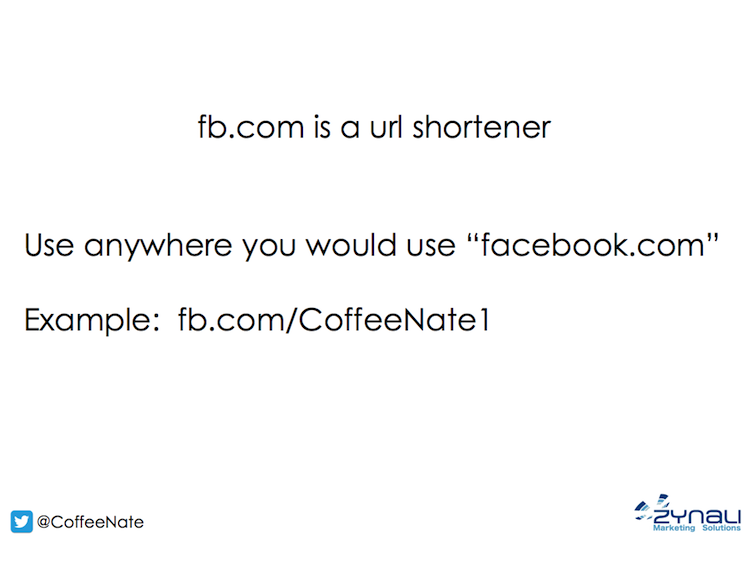
fb.com is a URL shortener for all Facebook.com addresses.
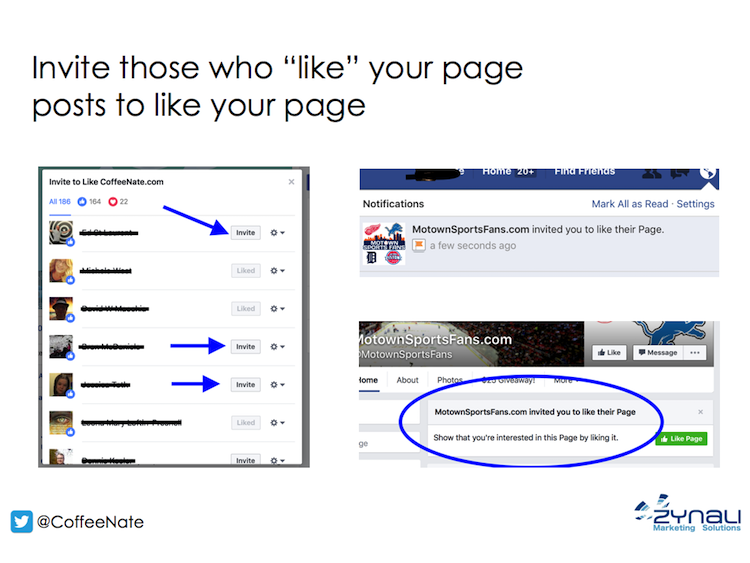
You can invite people who “like” your page post to “like” your page. To do this, click the number beside reactions, this brings up a lightbox with a list of those who have reacted to your post. You’ll see an “invite” button beside those who aren’t already connected to your page.
Click “Invite” and they’ll get a Facebook notification. The next time they navigate to your page, they’ll be reminded of the invitation and see a call to action to like your page.
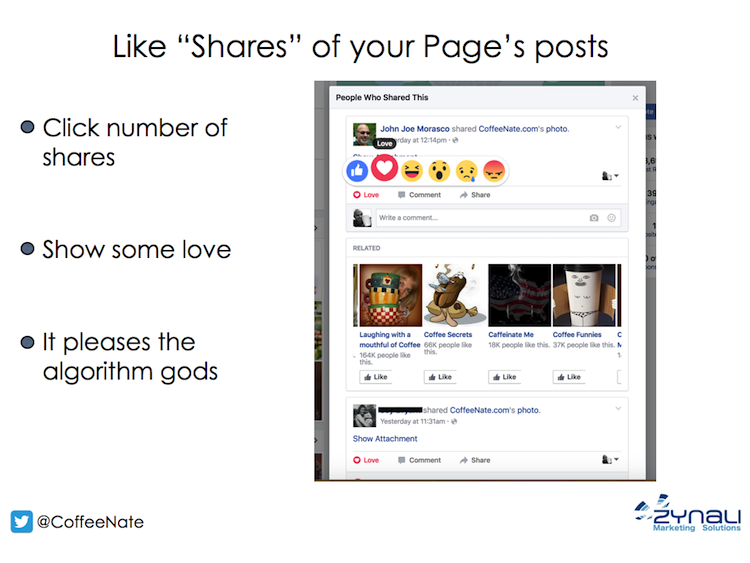
Acknowledge those who share your posts. Click the number of shares beside your post and you’ll see a lightbox that displays the public shares of your post. In this view, you can react or comment as your page. I routinely “love” every single share.
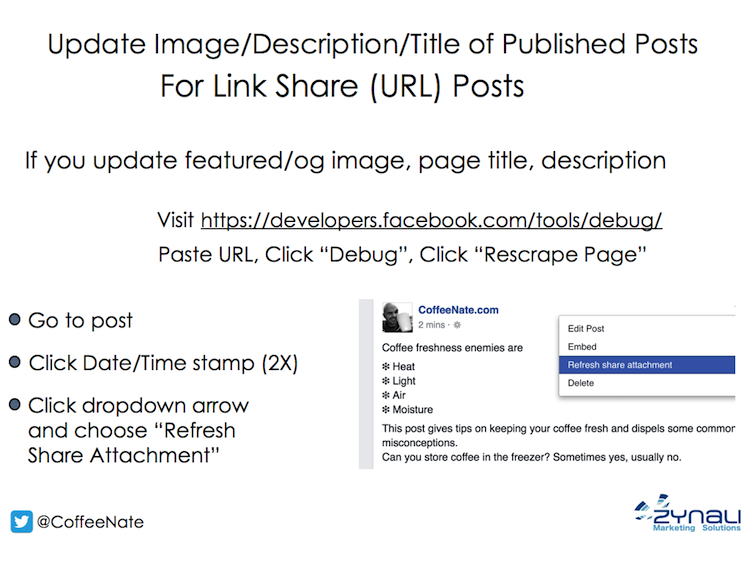
Sometimes, you update the featured image, title, or meta description of your post after you’ve shared it to Facebook. Before, you would have to delete and repost, losing the existing engagement. Now, you can force Facebook to rescrape your page to refresh their cached version, then click “Refresh share attachment” to dynamically update this information.
This feature is useful when you note a mistake or wish to alter your featured (og: image) image.
It can be tricky to find this link, as you must first click the time/date stamp to isolate the post. Click the dropdown and you’ll see the option.
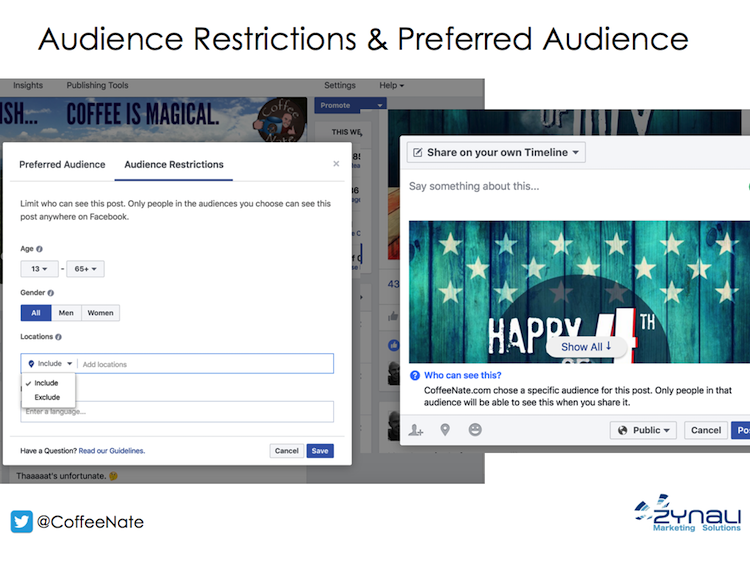
You can restrict who can see your posts, even when they visit your page. Narrow the audience by age, gender, location, and language.
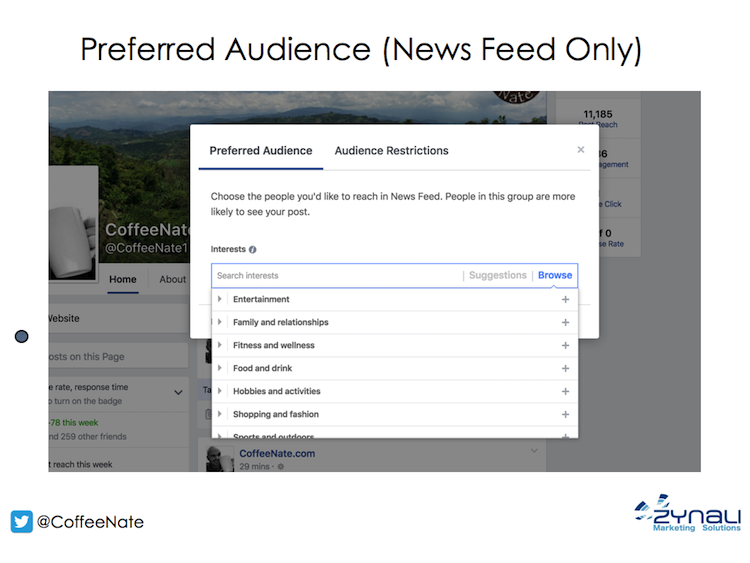
In addition to restricting the audience, you can choose your preferred, organic news feed targeting. Facebook has certainly put the screws to business pages over the past few years. The more effort you put into targeting your audience, the more effective your Facebook marketing becomes.
Your audience preference is interest-based according to the following categories;
- Entertainment
- Family and relationships
- Fitness and wellness
- Food and drink
- Hobbies and activities
- Shopping and fashion
- Sports and outdoors
- Technology
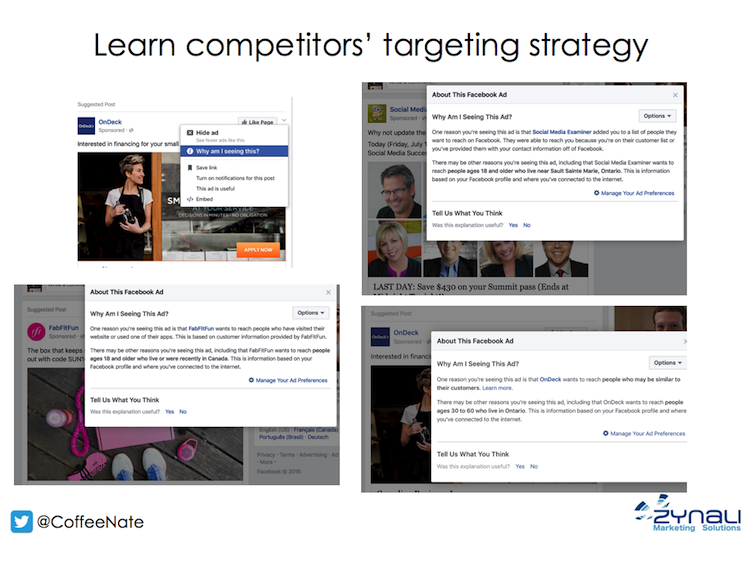 There are endless combinations targeting possibilities for your advertisements. While all audiences are unique, you can do some recon by seeing what targeting strategies your compeitors are using.
When you see an ad, click the dropdown on the right side of the post, then click “Why am I seeing this?” This action brings up a window that indicates at least some of the targeting criteria used in this ad placement.
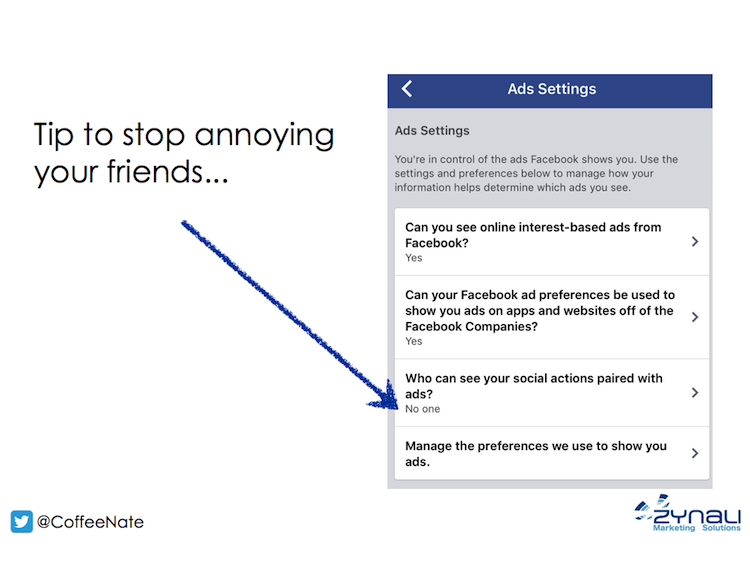
Have you ever seen a recurring ad with your friend’s face attached to it? While your friend did nothing wrong, perhaps it made you annoyed with them. “Bob likes Wix.”
In your profile settings, you can choose to not allow Facebook to pair your social actions with paid placements.
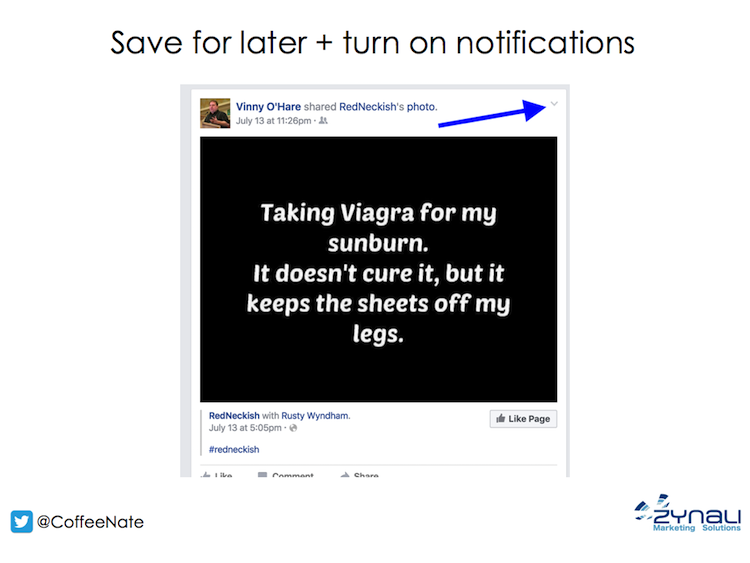
Have you ever seen a post you’d like to follow, but didn’t have anything to immediately add to the conversation. Maybe someone asked a question in a group, and you would like to see the answers. You don’t have to comment with a period or like the post.
Just click the dropdown at the right side of the post and choose “Turn on notifications for this post.”
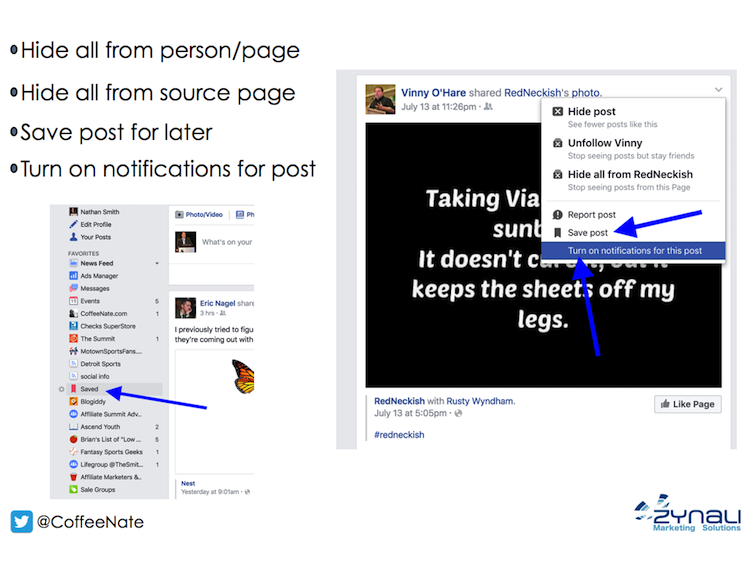
Another scenario is when you’re skimming Facebook during your word day. You see an interesting article that you don’t have time to read at the moment.
Instead of trying to recall who shared it to find it later, click the dropdown and then “Save post.”
Your saved posts are collected in a tab in the left column.
Facebook will also send you a reminder email if you haven’t read it.
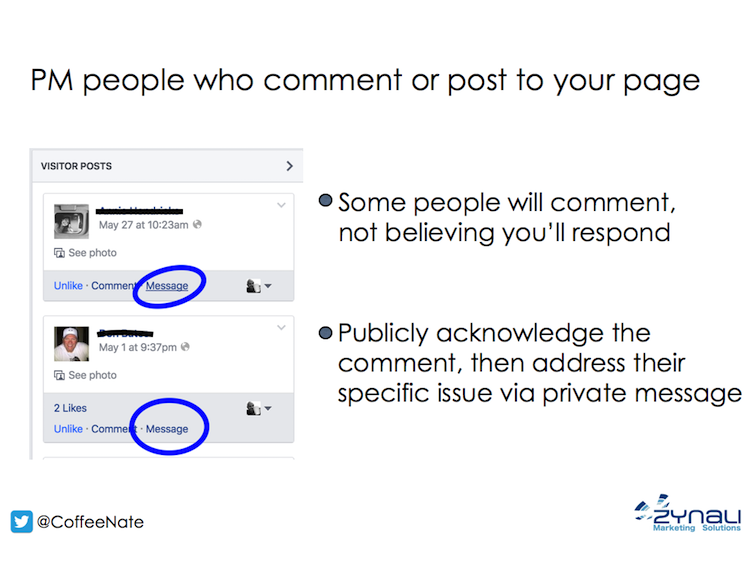
When people comment on your posts or they post to your page, there is an option to send them a private message as your page. This is especially helpful for customer service issues.
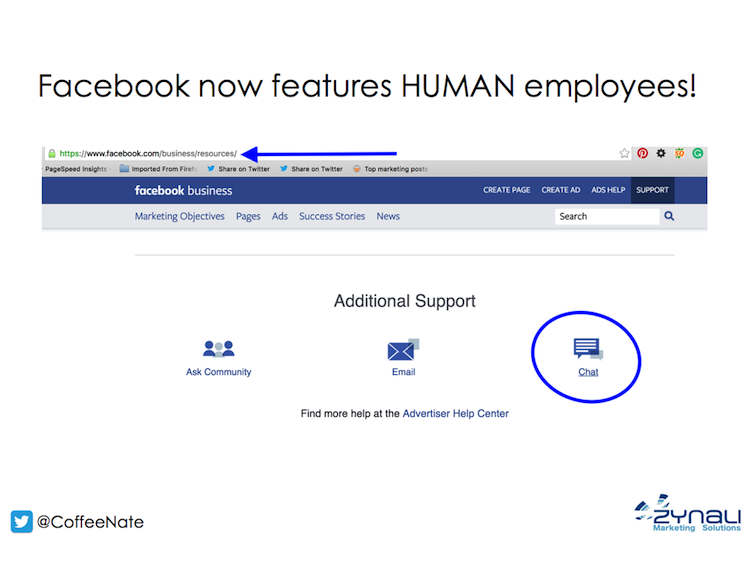
Not so long ago, Facebook’s customer service was on par with Google. Yeah, non-existent.
Things have gradually changed for the better. Recently, Facebook has launched monitored email and live chat avenues for customer service.
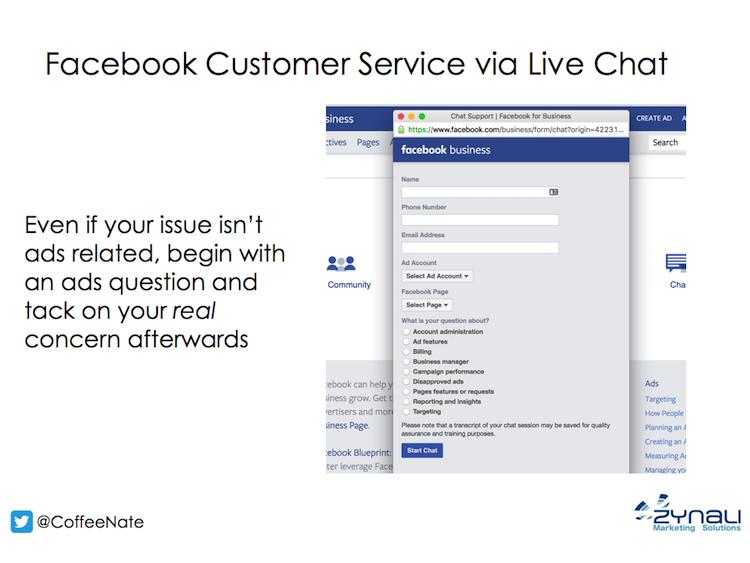
Live chat was initially launched specifically for their ad customers. If I had an issue that wasn’t directly related to advertising, I would begin with a question about ads and would spring my real concern when the agent would ask “is there anything else I can assist with?”
Recently, Facebook has expanded the live chat to cover all business purposes.
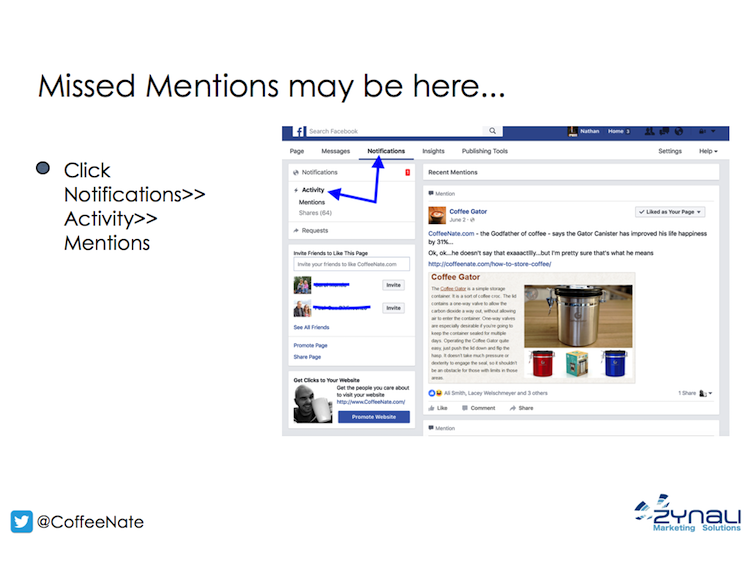
Go to your page and click “notifications” then “activity” to reveal mentions and shares you may have missed.
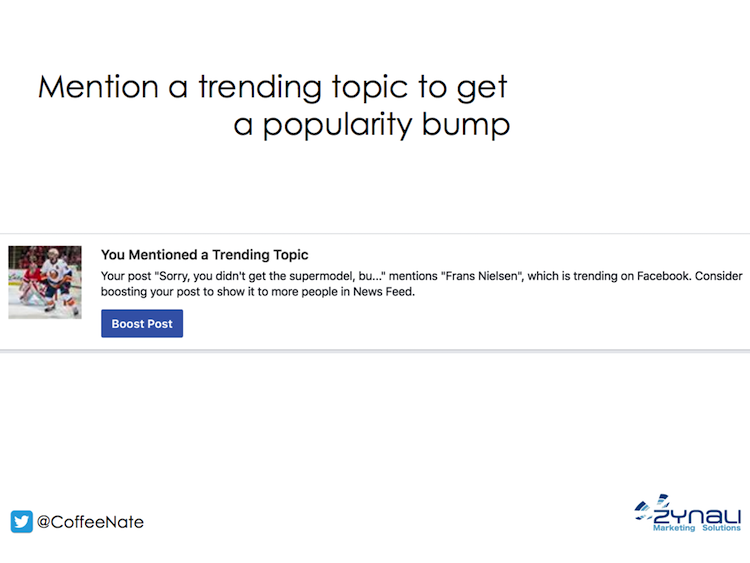
A timely post about a trending topic can give your post a boost in reach. Public posts display in the public feed of trending topics. When FB users click on a trending topic (right side of news feed), they may see your post.
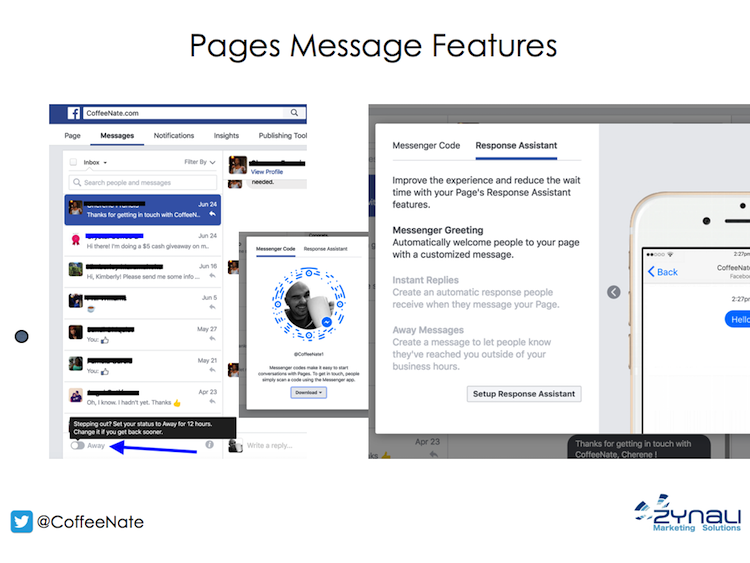
On your page, click “messages”, scroll down to the bottom and click the “i.”
Select “Response assistant”
Alternatively, click “settings” then “messages”
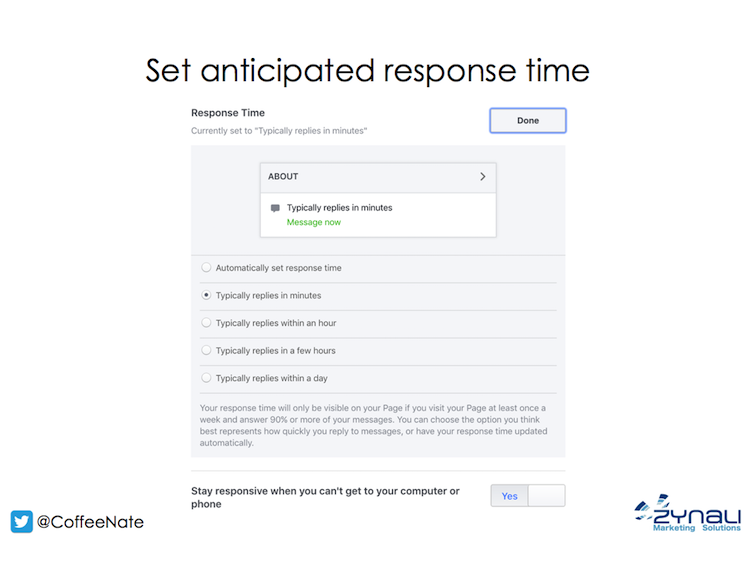
Set your response time
You also have the option to set up a series of automatic messages.
- A customized away message for when you’re not able to quickly respond to fans
- A personalized message that is automatically sent the first time someone sends your page a private message
- A specialized greeting that displays in messenger before a message is sent
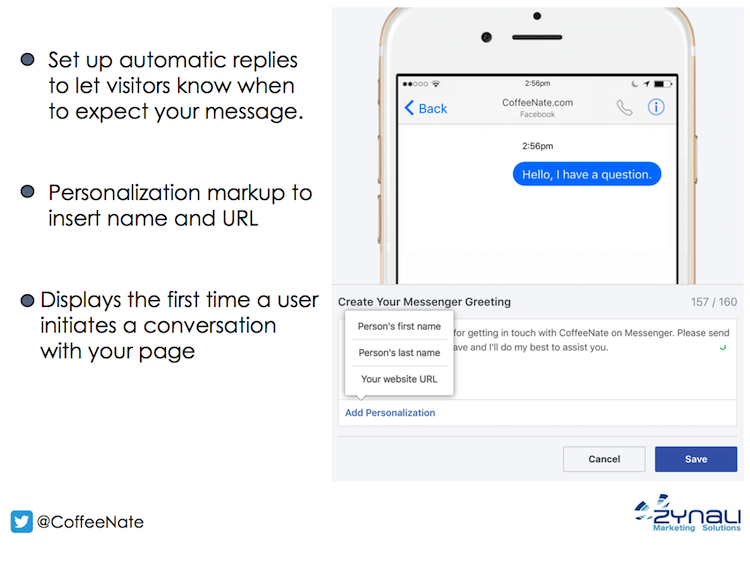
Messages can include the person’s name and/or your URL.
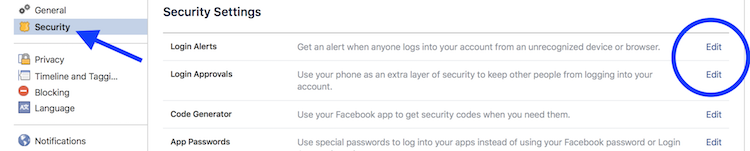
Last week, I was alerted to a login attempt on my Facebook account. Had I not enabled “login approvals” or “login alerts”, my account would’ve been compromised.
Facebook login approvals require a generated code to access the account via a new device or browser.
Facebook login alerts let you know when there is a suspicious login attempt on your account.
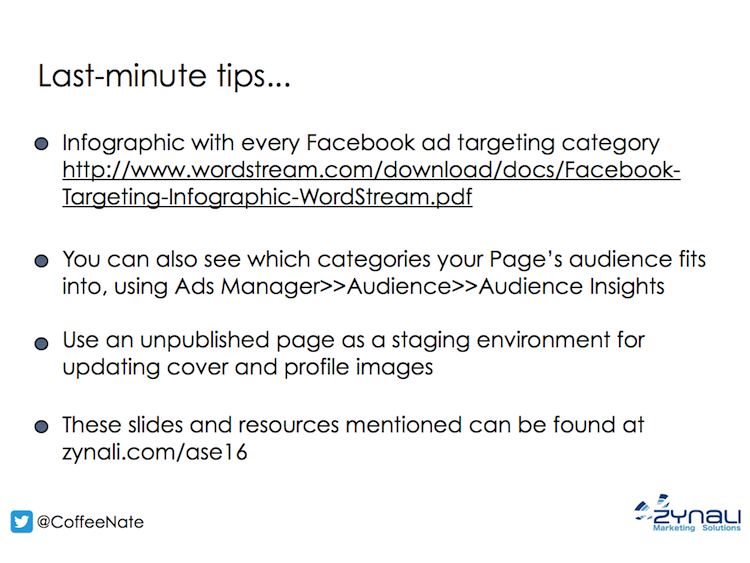
It can be difficult to grasp the targeting options that are available with Facebook ads. This post includes an infographic that provides an overview of most of the options.
